Self-Service Kiosk. Bigger Baskets. No Extra Staff.
Let customers browse your full menu, customise every item, and pay at the screen — no queuing, no pressure, no mistakes.
Runs on the Sunmi K2 or Sunmi Flex 3 kiosk terminal.
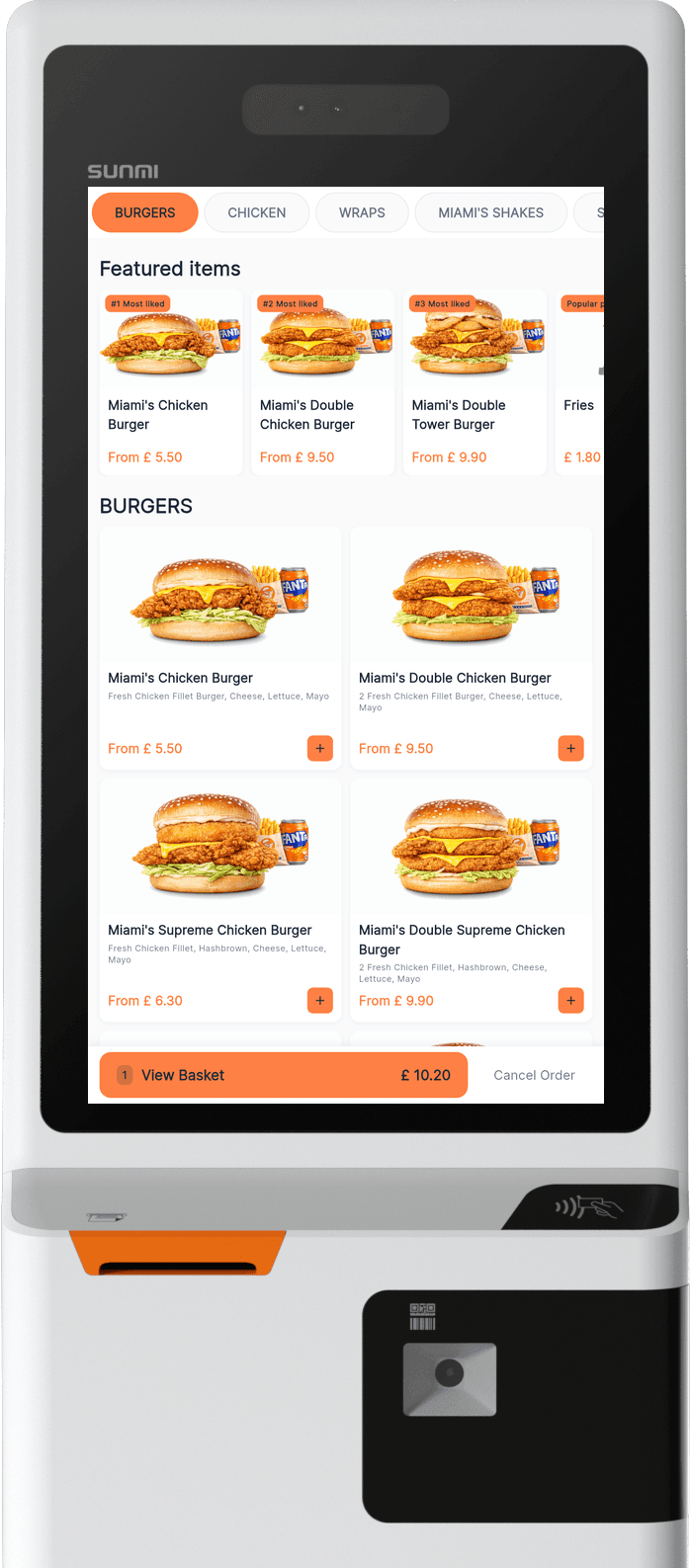
The self-service kiosk runs on purpose-built Android kiosk terminals — the Sunmi K2 or Sunmi Flex 3. One-off hardware purchase, no rental.
higher average basket value
extra staff needed
order accuracy
per device
Eye-Catching Attract Screen. Customers Serve Themselves.
A full-screen hero image draws customers in. They tap to choose Eat In or Take Away and they're straight into the menu. No waiting, no queuing, no staff needed at the counter.
- ✓Full-bleed product photography on attract screen
- ✓Eat In / Take Away selection from the start
- ✓Powered by MyFoodFast branding — professional look
Your Full Menu. Beautiful Product Images.
Category tabs across the top, product grid with images and prices below. Customers browse Burgers, Chicken, Wraps, Shakes — everything laid out exactly like your real menu. They see it, they want it, they add it.
- ✓Horizontal category tabs — Burgers, Chicken, Wraps, Shakes, Soft Drinks
- ✓Product grid with images, descriptions, and clear pricing
- ✓One-tap add to basket with running total
Every Customisation. Every Upsell. Every Time.
Meal or Single? What drink? Spice level? Extra cheese? The modifier system handles complex orders effortlessly. Customers customise exactly how they want — and your average basket grows with every extra.
- ✓Meal vs Single toggle with automatic drink selection
- ✓Spice level selector (Normal, Drizzle 25%, Half 50%, Full 100%)
- ✓Extras with per-item pricing — Cheese Slice +£0.20
From Browse to Order in 4 Steps
Customers do it all themselves. Your team focuses on the food.
Browse & Customise
Customers browse your full menu, tap to add items, and customise every detail
Review Order
Cart shows all items, quantities, kitchen notes, and running total
Pay & Confirm
Card or cash — the customer chooses. One tap to place the order.
Order Number & Receipt
Order number displayed, receipt printed. Straight to the POS and KDS.

Kitchen Notes. Card or Cash. One Tap Checkout.
The cart shows every item with full customisation details, quantity controls, and a running total. Customers can add kitchen notes for allergies or special requests. Then they choose Card or Cash and confirm — order goes straight to your POS and KDS.
Smart Kiosk Features
Built-in intelligence that handles the edge cases.

Idle Timeout
"Are you still there?" auto-prompts after inactivity with countdown timer. Clears abandoned sessions automatically.

Cancel Protection
"Are you sure?" confirmation prevents accidental basket clears. One tap to keep ordering.

View Basket Bar
Persistent basket bar at the bottom shows item count and total — always visible while browsing.
Why Add a Kiosk?
Every benefit backed by real takeaway operations.
Bigger baskets, automatically
Customers spend up to 15% more when ordering at their own pace without queue pressure.
No extra staff needed
The kiosk takes orders while your team focuses on preparation and service.
Zero order errors
Customers choose their own items and customisations — no miscommunication.
Purpose-built Sunmi hardware
Runs on the Sunmi K2 or Sunmi Flex 3 kiosk terminal. No contracts, no lock-in.
Straight to POS and KDS
Orders appear on your POS and kitchen display the moment they're placed.
Works alongside counter ordering
Run kiosk and counter service simultaneously during busy periods.
Eat In and Take Away
Customers choose at the start — order type flows through to POS and receipt.
Receipt auto-prints
Order number and receipt print automatically — no staff interaction needed.
Kiosk vs Counter Ordering
Side by side — why kiosks win at peak hour.
| Counter Ordering | Self-Service Kiosk | |
|---|---|---|
| Average basket size | Baseline | +8–15% larger — no queue pressure |
| Staff required | 1 per register | Zero — runs itself |
| Order accuracy | Human error risk | 100% — customer enters it |
| Queue times | Grows at peak | Multiple kiosks, no waiting |
| Upselling | Staff dependent | Built-in — every order, every time |
| Peak hour capacity | Limited by staff | Scales with tablets |
Average basket size
Staff required
Order accuracy
Queue times
Upselling
Peak hour capacity
Purpose-Built Kiosk Hardware
Two kiosk terminals from Sunmi — the K2 for full self-service with built-in payments and printing, or the Flex 3 for a more compact, wall-mountable setup.
Sunmi K2
Terminal
A 24-inch Full HD self-service kiosk terminal with built-in receipt printer, NFC payments, 2D barcode scanner, and 3D facial recognition. Floor-standing or countertop — professional look for any takeaway.
- ✓24" Full HD (1920×1080) capacitive touchscreen
- ✓Built-in 80mm receipt printer with auto-cutter
- ✓NFC contactless payments — Apple Pay, Google Pay, tap-to-pay
- ✓2D barcode scanner for loyalty cards and vouchers
- ✓Android 13, Qualcomm processor, Wi-Fi + Ethernet
- ✓Floor stand or countertop bracket

Sunmi Flex 3
Terminal — 22" or 27"
22" £878 ex VAT · 27" £989 ex VAT
Full HD Android touchscreen kiosk in two sizes — 22" or 27". Wall-mount or countertop. Lower cost than the K2; same hardware can double as a kitchen display (KDS) if your needs change.
- ✓Available in 22" or 27" Full HD (1920×1080) capacitive touchscreen
- ✓Wall-mount or countertop bracket
- ✓No built-in printer — receipt prints at POS
- ✓No NFC — customer pays at counter (Cash option)
- ✓Doubles as a KDS unit later if needed
“Start with a Sunmi Flex 3 terminal to test the kiosk concept at a lower price point. When you see the basket sizes grow and want built-in payments and receipt printing, upgrade to the Sunmi K2.”
Hardware prices ex VAT. One-off purchase — no monthly rental. Kiosk software is £59/mo per device. Source: ERS Online (UK).
Customise the kiosk experience from the back office
Pick the attract-screen image, decide which products show on the kiosk, set upsell prompts, and brand every screen — without touching the device. Every change publishes instantly to every kiosk in your store.
- Upload your own attract-screen artwork and idle-loop graphics
- Show or hide products and modifiers per channel (kiosk vs counter)
- Configure upsell prompts (meals, drinks, sides) and basket bar copy
- Set idle timeout, language, and Eat In / Take Away defaults
Self-Service Kiosk — devices & platform
Add a Self-Service Kiosk.
Runs on the Sunmi K2 or Sunmi Flex 3 kiosk terminal. No contracts, no lock-in.
No contracts. No aggregator commission. Cancel anytime.